
Download ToastWiz – AI Wedding Speech Writer, Free & Secure Tool
Overview
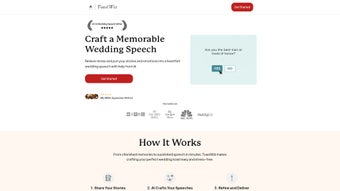
ToastWiz is a cutting‑edge, AI‑powered web application created especially for anyone who wants to deliver a memorable wedding speech without the stress of writer’s block. Whether you’re the best man, maid of honor, a parent, or a close friend, the platform guides you through a series of intuitive prompts that capture the couple’s most cherished moments, funny anecdotes, and heartfelt memories. Once you submit your answers, ToastWiz’s advanced natural‑language engine crafts four distinct speech drafts, each featuring smooth transitions, emotional peaks, and a polished structure that feels like it was written by a professional speechwriter.
The drafts are emailed directly to you, ready for instant review, fine‑tuning, or even printing. Because everything runs in the cloud, there’s no need to install bulky software—simply log in from any device, input your story snippets, and let the AI do the heavy lifting. The service is designed for both meticulous planners who want weeks to polish their toast and last‑minute speakers who need a reliable, high‑quality speech in under an hour.
With ToastWiz, confidence replaces anxiety, allowing you to focus on delivering a genuine, unforgettable tribute to the newlyweds.
Key Features & Capabilities
- Guided Prompt System: Step‑by‑step questions help you extract the most meaningful stories and jokes.
- Four AI‑Generated Drafts: Receive multiple variations to choose the tone that best matches your personality.
- Instant Email Delivery: Drafts are sent to your inbox within minutes, ready for editing.
- Customization Tools: Inline editing, tone adjustment sliders, and word‑count limits for perfect tailoring.
- Smart Transitions: Built‑in flow logic ensures each segment moves naturally, avoiding awkward pauses.
- Emotion‑Balancing Engine: Balances humor, sentiment, and formality to keep the audience engaged.
- Secure Cloud Storage: Your personal data and speech drafts are encrypted and never shared with third parties.
- Cross‑Device Access: Works on Windows, macOS, Android, and iOS browsers—no app download required.
- Free Tier & Affordable Upgrade: Generate basic drafts for free; premium plan unlocks unlimited revisions and priority support.
- Last‑Minute Rescue Mode: A rapid‑write option that produces a polished 3‑minute toast in under five minutes.
Installation, Usage Instructions & Compatibility
Getting Started – No Installation Required
ToastWiz is a web‑based solution, which means there’s nothing to download or install on your computer. Simply open your preferred browser, navigate to www.toastwiz.com, and create a free account using an email address or social login. After confirming your email, you’ll be taken to the dashboard where the guided prompt wizard awaits.
Step‑by‑Step Workflow
- Select your role: Choose whether you’re a best man, maid of honor, parent, or friend. This tailors the tone suggestions.
- Answer the prompts: Provide details such as how the couple met, memorable trips, funny mishaps, and personal qualities you admire.
- Set preferences: Adjust the desired length (2‑5 minutes), humor level, and formality using easy sliders.
- Generate drafts: Click “Create My Toast” and watch the AI process your inputs. Within minutes, four drafts appear on screen and are emailed to you.
- Edit & personalize: Use the built‑in editor to tweak sentences, add personal jokes, or reorder sections. The AI suggestions remain clickable for quick replacements.
- Export & practice: Download the final version as a PDF, copy it to your phone, or print it for rehearsal.
Operating System Compatibility
ToastWiz runs flawlessly on any modern operating system that supports a current web browser, including Windows 10/11, macOS Monterey and later, Android 8.0+, and iOS 13+. Because the service is cloud‑based, performance depends on a stable internet connection rather than local hardware, making it an ideal solution for travelers and on‑the‑go speakers.
Updates & Support
Since ToastWiz lives in the cloud, updates are applied automatically without user intervention. New features—like multilingual support and AI‑driven rehearsal timers—are rolled out monthly. Users on the premium plan receive priority email support and a dedicated help‑center with video tutorials, while free users can access community forums and a knowledge base.
Pros, Cons & Frequently Asked Questions
Pros
- Zero installation – works directly from any browser.
- AI generates multiple high‑quality drafts, saving hours of writing.
- Secure, encrypted storage protects personal anecdotes.
- Flexible customization lets you keep your unique voice.
- Cross‑platform compatibility for Windows, macOS, Android, and iOS.
- Free tier available with generous features; affordable premium upgrade.
- Fast turnaround, especially with the “Last‑Minute Rescue” mode.
Cons
- Requires an internet connection; offline use is not possible.
- AI may occasionally produce generic phrasing that needs tweaking.
- Advanced tone‑control features are locked behind the paid plan.
- Limited language support currently (English only).
FAQ
Is ToastWiz really free to use?
Yes, ToastWiz offers a free tier that lets you generate up to three speech drafts per month. The premium subscription unlocks unlimited drafts, advanced editing tools, and priority support.
How secure is my personal data?
All user information and generated speeches are encrypted both in transit (TLS) and at rest. ToastWiz does not sell or share your data with third parties.
Can I edit the AI‑generated drafts?
Absolutely. The built‑in editor allows you to modify any part of the draft, add new paragraphs, or delete sections. You can also request a new version based on your edits.
Do I need any technical skills to use ToastWiz?
No technical expertise is required. The guided prompts and intuitive UI are designed for users of all ages and backgrounds.
What if I need a speech in a different language?
Currently, ToastWiz supports English only, but multilingual support is on the roadmap for 2025.
Review Summary
Overall Rating: 4.7 / 5
Pros: Easy access, fast AI drafts, secure cloud storage, cross‑device compatibility.
Cons: Requires internet, limited language options, premium needed for full customization.
Conclusion & Call to Action
Crafting a wedding speech should be a joyous part of the celebration, not a source of anxiety. ToastWiz removes the guesswork by delivering professionally structured, emotionally resonant drafts in moments, while still giving you full control to personalize every word. Whether you’re rehearsing weeks ahead or scrambling for a heartfelt toast the night before, the platform’s AI engine, secure cloud environment, and intuitive workflow make it the go‑to tool for anyone who wants to speak from the heart with confidence. Ready to impress the newlyweds and their guests?
Start your free ToastWiz account today and experience the difference between a generic speech and a tailor‑made tribute that truly reflects your relationship with the couple. Upgrade to premium for unlimited drafts, advanced editing, and priority support—because unforgettable moments deserve the best preparation.



.png)



